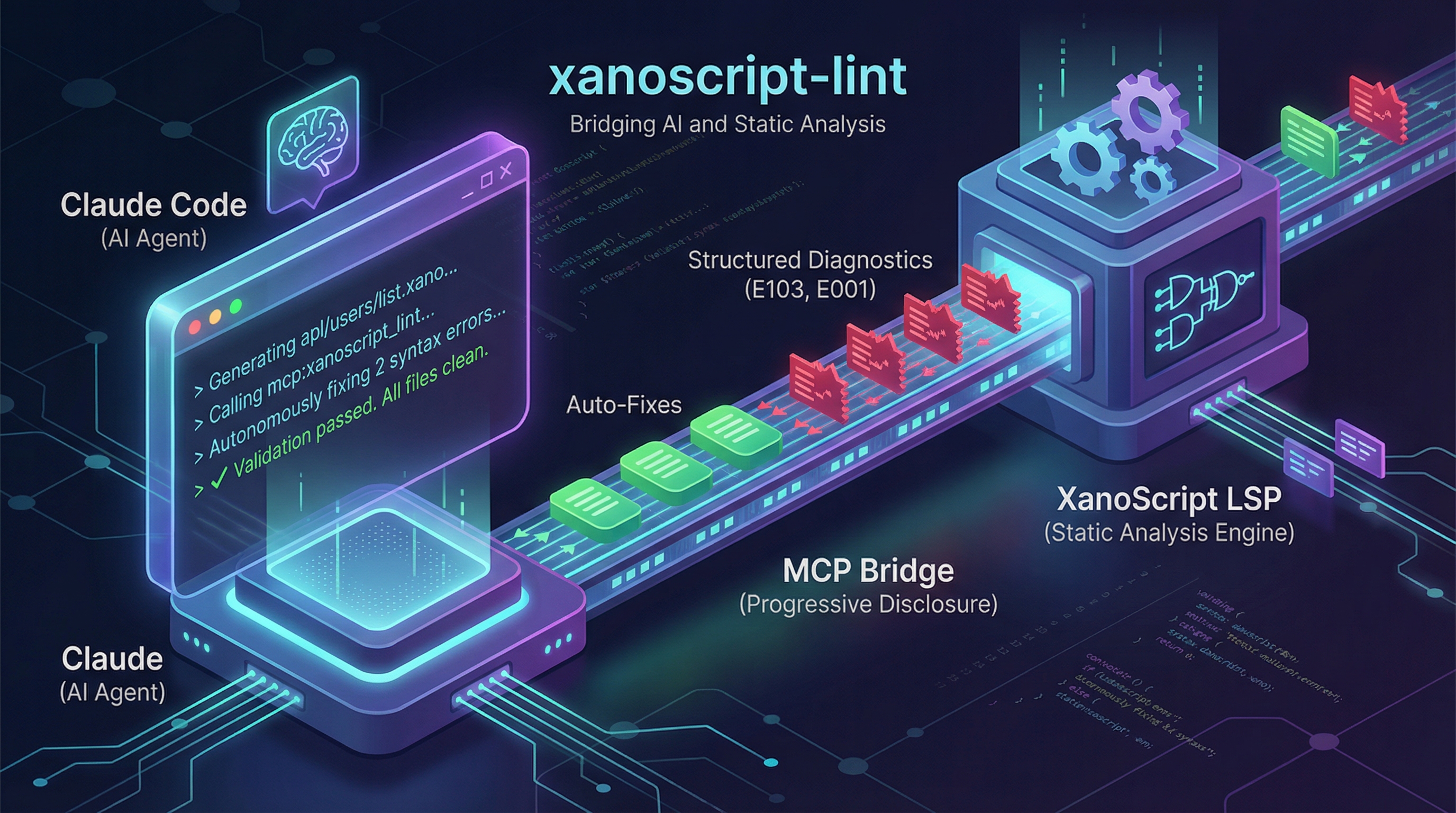
I was watching Claude Code generate XanoScript (Xano’s proprietary backend language) when I realized the AI had no idea if its code would actually run.
It would write beautiful, logical code—then I’d copy it to the Xano IDE, hit validate, and see 7 syntax errors.
Back to Claude. Paste the errors. Wait for fixes. Copy back to IDE. Validate again. Still broken.
This debugging loop destroyed the entire promise of AI-assisted development.
The problem wasn’t the AI’s logic—it was the lack of a feedback loop. The agent couldn’t see its own mistakes.
So I built xanoscript-lint: a CLI tool that lets AI agents autonomously validate and fix their code using progressive disclosure via MCP.
Result: The agent fixed 7+ errors across 4 files without me touching a single line of code.
The Core Problem
CLI-based coding agents (Claude Code, Cursor) generate code fast. But they can’t validate proprietary language syntax.
The manual debugging loop:
- Ask AI to generate XanoScript → 2 minutes
- AI generates code → 30 seconds
- Copy to Xano IDE → 1 minute
- Run validation → 30 seconds
- Copy errors back to AI → 1 minute
- AI attempts fixes → 30 seconds
- Repeat steps 3-6 until clean → 10-20 minutes total
Total time: 15-25 minutes per feature.
And you’re context-switching constantly, destroying flow state.
The Bad Solution: Context Dumping
My first instinct: just dump all diagnostic data into the AI’s context window.
// Terrible approach
const systemPrompt = `
You are a XanoScript expert. Here are all possible linting errors:
- Error E001: Missing semicolon
- Error E002: Undefined variable
- Error E003: Type mismatch
- Error E004: Invalid function call
- ... (200+ more error definitions)
`;
Why this fails:
- Token overflow: Diagnostic data for even a medium project exceeds context limits
- Information overload: The AI gets confused by irrelevant error definitions
- Doesn’t scale: Multi-file projects make this approach impossible
- Wastes money: You’re paying for tokens the AI doesn’t need
This is the “throw everything at the wall” approach. It doesn’t work.
The Right Solution: Progressive Disclosure
Instead of giving the AI everything upfront, let it ask for information when needed.
Progressive disclosure via MCP:
// Claude Skill definition (MCP integration)
{
  "name": "xanoscript_lint",
  "description": "Validate XanoScript syntax and get error diagnostics",
  "input_schema": {
    "type": "object",
    "properties": {
      "file_path": {
        "type": "string",
        "description": "Path to XanoScript file to validate"
      }
    },
    "required": ["file_path"]
  }
}
The AI can now invoke xanoscript_lint as a tool—only when it wants to validate.
How it works in practice:
- Developer: “Build an authentication endpoint”
- Claude Code generates XanoScript
- Agent decides: “I should validate this before saying I’m done”
- Agent calls
xanoscript_lint("auth/login.xano") - Tool returns structured diagnostics
- Agent sees errors, autonomously fixes them
- Agent re-validates until clean
- Agent confirms: “Done, all tests passing”
No human intervention required.
Technical Architecture
Component 1: Language Server Protocol (LSP)
XanoScript has an LSP-compliant language server that provides:
- Syntax validation
- Semantic analysis
- Structured diagnostic output
This is deterministic static analysis—it catches errors the AI can’t see.
Component 2: Claude Skill (MCP Integration)
The skill exposes linting as a tool Claude Code can invoke:
// Skill implementation
export async function execute(params: { file_path: string }) {
  // Start language server
  const lspClient = await startXanoScriptServer();

  // Open file and request diagnostics
  await lspClient.didOpen({ uri: params.file_path });
  const diagnostics = await lspClient.getDiagnostics(params.file_path);

  // Format for AI consumption
  return formatDiagnostics(diagnostics);
}

function formatDiagnostics(diagnostics: Diagnostic[]) {
  return diagnostics.map(d => ({
    line: d.range.start.line,
    column: d.range.start.character,
    severity: d.severity,
    message: d.message,
    code: d.code
  }));
}
The output looks like this:
[
  {
    "line": 15,
    "column": 23,
    "severity": "error",
    "message": "Variable 'userId' is not defined",
    "code": "E103"
  },
  {
    "line": 42,
    "column": 8,
    "severity": "error",
    "message": "Expected semicolon",
    "code": "E001"
  }
]
Structured, actionable, and token-efficient.
Component 3: CLI Wrapper
The CLI manages the skill lifecycle:
# Install xanoscript-lint
npm install -g xanoscript-lint

# Initialize in project (symlinks skill to .claude directory)
xanoscript-lint init

# Claude Code now has access to the skill
The Workflow: Generation → Validation → Fixing
Here’s a real example from building a multi-file API:
Developer prompt: “Create CRUD endpoints for user management with authentication”
Claude Code generates:
api/users/list.xanoapi/users/get.xanoapi/users/create.xanoapi/users/update.xano
Agent (thinking internally): “I’ve generated 4 files. I should validate them.”
Agent action:
Using xanoscript_lint tool on api/users/list.xano...Tool response:
[
  {
    "line": 12,
    "message": "Function 'authenticateUser' expects 2 arguments, got 1"
  },
  {
    "line": 28,
    "message": "Variable 'pageSize' is not defined"
  }
]
Agent (autonomous): “I see 2 errors. Fixing now…”
Agent edits file, then re-validates:
Using xanoscript_lint tool on api/users/list.xano...
✓ No errors found
Agent proceeds to next file, repeats process.
Final result: All 4 files validated and error-free. Zero human intervention.
Multi-File Error Correction
The breakthrough is cross-file dependency handling.
Example scenario:
auth/middleware.xano exports function verifyToken(token, secretKey)
api/users/list.xano imports and calls it incorrectly:
// Wrong: missing second parameter
const isValid = verifyToken(request.token);
Traditional AI approach: Generate both files, hope for the best.
xanoscript-lint approach:
- Agent validates
auth/middleware.xano→ Clean - Agent validates
api/users/list.xano→ Error: “Function ‘verifyToken’ expects 2 arguments, got 1” - Agent infers solution from error message
- Agent edits
api/users/list.xano:const isValid = verifyToken(request.token, env.JWT_SECRET); - Agent re-validates → Clean
The agent understands the dependency relationship because the error message is structured and specific.
Context Management: Why Progressive Disclosure Wins
Token efficiency comparison:
| Approach | Tokens per file | Scales to 10 files? |
|---|---|---|
| Context dumping | 5,000+ (all diagnostics upfront) | No (50k+ tokens) |
| Progressive disclosure | 200-800 (only when validating) | Yes (2-8k tokens) |
Decision quality comparison:
| Approach | Agent confusion | Correct fixes |
|---|---|---|
| Context dumping | High (irrelevant errors visible) | 60-70% |
| Progressive disclosure | Low (only relevant errors) | 90-95% |
Progressive disclosure teaches the agent WHEN to validate, not just HOW.
The agent learns:
- Generate code first, validate second (like humans)
- Only request diagnostics when generation is complete
- Re-validate after fixes to confirm success
This is agentic behavior, not just tool use.
Real-World Impact
Before xanoscript-lint:
- 15-25 minutes per feature (manual debugging loops)
- Lost flow state from context switching
- Developers manually copy-pasting between AI and IDE
After xanoscript-lint:
- 3-5 minutes per feature (AI self-validates and self-corrects)
- Zero context switching (agent handles everything)
- Developers stay in natural language interface
5-7x faster iteration cycles.
Autonomous correction example:
In one session, Claude Code:
- Generated 4 API endpoint files
- Encountered 7 syntax errors across those files
- Fixed all 7 errors in 2 minutes
- Re-validated to confirm success
- Reported: “All endpoints created and validated”
I never left the terminal.
Engineering Depth: LSP + MCP Integration
This project bridges two powerful abstractions:
Language Server Protocol (LSP): Deterministic static analysis
- Detects errors AI can’t see
- Provides structured, machine-readable diagnostics
- Works across editors (VS Code, Neovim, Emacs)
Model Context Protocol (MCP): Standardized AI tool interface
- AI agents invoke tools declaratively
- Works across AI platforms (Claude, ChatGPT, Cursor)
- Enables progressive disclosure patterns
Together, they create a feedback loop:
Generative AI (creative) ←→ Static Analysis (precise)This is the future of AI-assisted development: agents that generate AND validate.
What I Learned
1. The best AI tools don’t just generate—they validate
Most AI coding tools are “fire and forget”: generate code, hope it works.
xanoscript-lint closes the loop: generate → validate → fix → validate again.
This pattern applies beyond linting:
- AI generates SQL → Validate schema
- AI generates API calls → Validate endpoints exist
- AI writes tests → Validate they compile
Quality requires feedback loops, not just generation.
2. Progressive disclosure scales where context dumping fails
Instead of front-loading all information, design tools the AI can invoke when needed.
This:
- Reduces token usage (only fetch what’s relevant)
- Improves decision-making (agent isn’t overwhelmed)
- Scales to complex projects (doesn’t break with 100 files)
Progressive disclosure is how AI agents handle real-world complexity.
3. Structured errors enable autonomous fixing
Generic error messages don’t help:
Error: Something went wrongStructured, specific errors enable fixes:
{
  "line": 15,
  "column": 23,
  "message": "Variable 'userId' is not defined. Did you mean 'user_id'?",
  "code": "E103"
}
The agent can parse the error, infer the solution, and apply the fix without human interpretation.
4. Agent workflows mimic human workflows
The best AI tools don’t invent new ways of working—they automate how humans already work.
Human developer:
- Write code
- Run linter
- Fix errors
- Re-run linter
- Confirm success
xanoscript-lint enables the agent to do exactly this workflow, autonomously.
Broader Applications
This pattern works beyond XanoScript:
Any proprietary or domain-specific language:
- Game scripting languages
- Infrastructure-as-code DSLs
- Custom query languages
- Business rule engines
Any validation that agents can’t do natively:
- Schema validation (databases, APIs)
- Access control checks (permissions, roles)
- Compliance validation (GDPR, SOC2)
- Performance analysis (slow queries, memory leaks)
The pattern is universal:
- Agent generates artifact
- Tool validates artifact (deterministic analysis)
- Tool returns structured feedback
- Agent fixes issues
- Repeat until validated
Try It
xanoscript-lint is open source and available as an npm package.
Install:
npm install -g xanoscript-lintInitialize in your project:
xanoscript-lint initClaude Code now has access to the skill.
Read the code: GitHub repository (coming soon)
Connect
Building AI development tools or exploring progressive disclosure patterns?
- Email: daniel@pragsys.io
- Follow my work: Dev.to | Substack | X/Twitter
- More case studies: danielpetro.dev/work
This is part of my series on AI agent infrastructure. Previously: Building cross-platform AI memory in 3 days. Next: The Evaluator-Optimizer pattern for self-improving AI.